Reviewing Outgoing Emails in AiSDR: Where to Look?
Last updated: September 28, 2026
If you're curious about the emails your campaign is sending, there are two easy ways to check them:
Previewing Email Examples
When you're setting up your campaign, click the "Generate Sequence" button on the campaign or persona page. This generates examples of your messaging, giving you a clear idea of what your actual outreach will look like.

Keep in mind, these are examples only, not the exact emails sent to your leads. But don't worry, the final emails will closely match the samples, keeping the same structure and tone.
Reviewing Actual Sent Emails
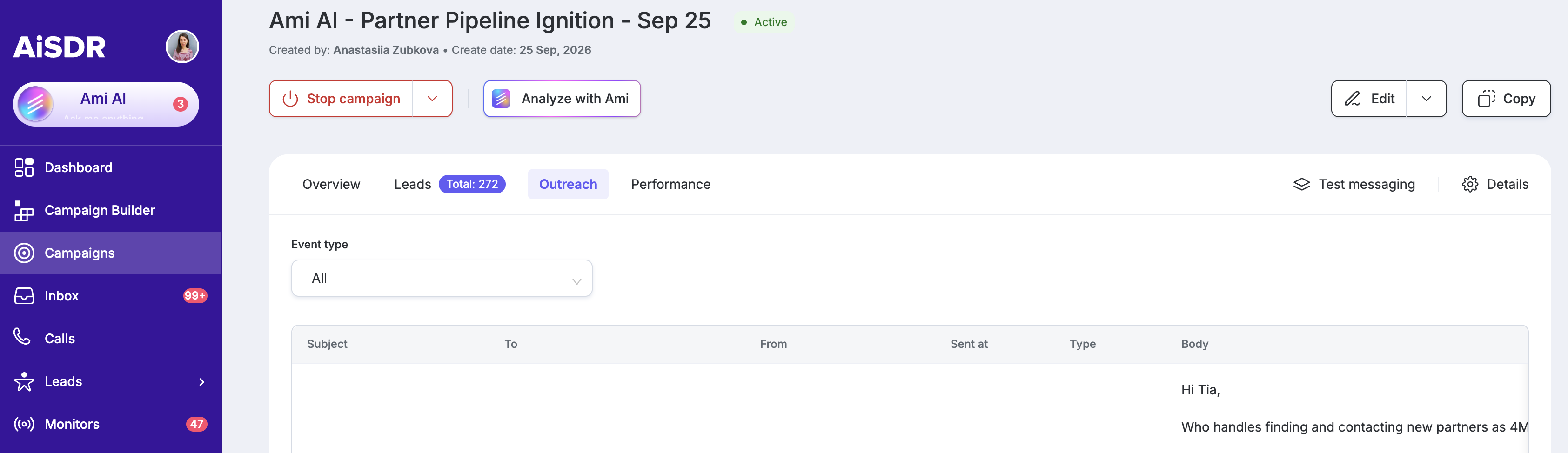
After your campaign is live, you can review the real emails sent:
Go to your active campaign page.
Open the Outreach tab.
Use the event filter and select "Outgoing" to view all sent emails, or "LinkedIn Outgoing" to review LinkedIn messages.