AI Monitoring: continuously track your lists for meaningful changes
Last updated: April 23, 2026
AI Monitoring transforms static lists into a dynamic source of opportunity.
Instead of relying on manual CRM reviews, AiSDR continuously monitors your contact and company lists for meaningful changes: from job moves and promotions to funding events, hiring activity, and other high-value signals.
The result is a more proactive way to identify expansion potential, reactivate dormant accounts, and surface sales opportunities the moment they emerge.
Core Concepts
What is AI Monitoring
AI Monitoring is designed to help teams stay ahead of change.
It continuously watches your CRM-based lists of contacts or companies and identifies records that match the signals and criteria you define. Rather than revisiting CRM lists manually or relying on outdated data, you can automatically detect the moments that matter most.
These may include:
a prospect changing roles
a company raising funding
a team scaling headcount
hiring activity in key go-to-market roles
leadership transitions
publicly visible signs of new priorities or emerging pain points
In essence, AI Monitoring turns your CRM into a live opportunity discovery engine.
Why use AI Monitoring?
AI Monitoring is especially valuable when you want to uncover opportunities hidden inside your existing CRM.
Expand existing customer accounts
Monitor current customer lists for expansion signals such as: new funding, accelerated hiring, growth in sales teams, role changes among decision-makers, broader signs of company expansion
These signals can help identify the right moment for upsell, cross-sell, or account expansion.
Reactivate dormant or previously lost opportunities
Apply AI Monitoring to lists such as: closed-lost accounts, churned customers, inbound leads, webinar and event contacts, previously unqualified prospects
Instead of leaving these records untouched, you can monitor them for new developments that may reopen the conversation at exactly the right time.
Create a more proactive pipeline
Rather than waiting for prospects to re-engage, AI Monitoring helps your team act on change as it happens, with context, relevance, and timing already built in.
What can AI Monitoring detect?
AI Monitoring helps you identify meaningful changes across the people and companies in your HubSpot lists.
It can detect signals such as:
job changes and promotions, including role changes or moves to a new company
company growth and funding, such as expansion, hiring growth, or funding activity
publicly expressed pain points or initiatives, including challenges, priorities, or new projects shared publicly
hiring signals, especially for commercially relevant roles like SDRs, AEs, or revenue leaders
Beyond these signal types, AI Monitoring can also help surface signs that a person or company may be becoming a stronger fit for outreach: for example, when new priorities emerge, growth accelerates, or a previously inactive prospect becomes relevant again.
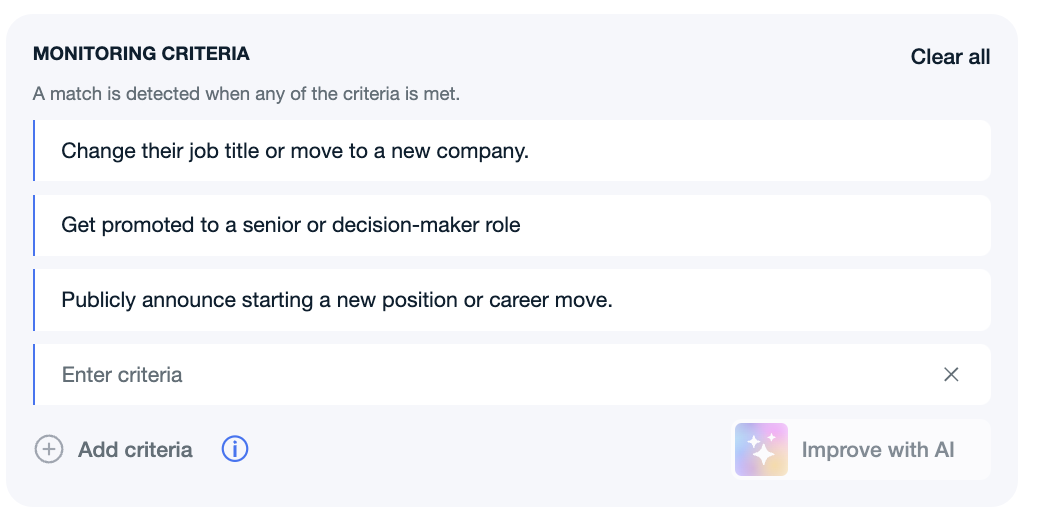
You can also define custom criteria to align monitoring with your team’s specific goals and sales motion.
How does AI Monitoring work, and how to set it up?
Hubspot
Setting up AI Monitoring is straightforward:
Navigate to Monitoring Lists in AiSDR.
Click Create List.
Select HubSpot as your source.
Choose whether you want to monitor people or companies.
Select the HubSpot list you want AiSDR to track.
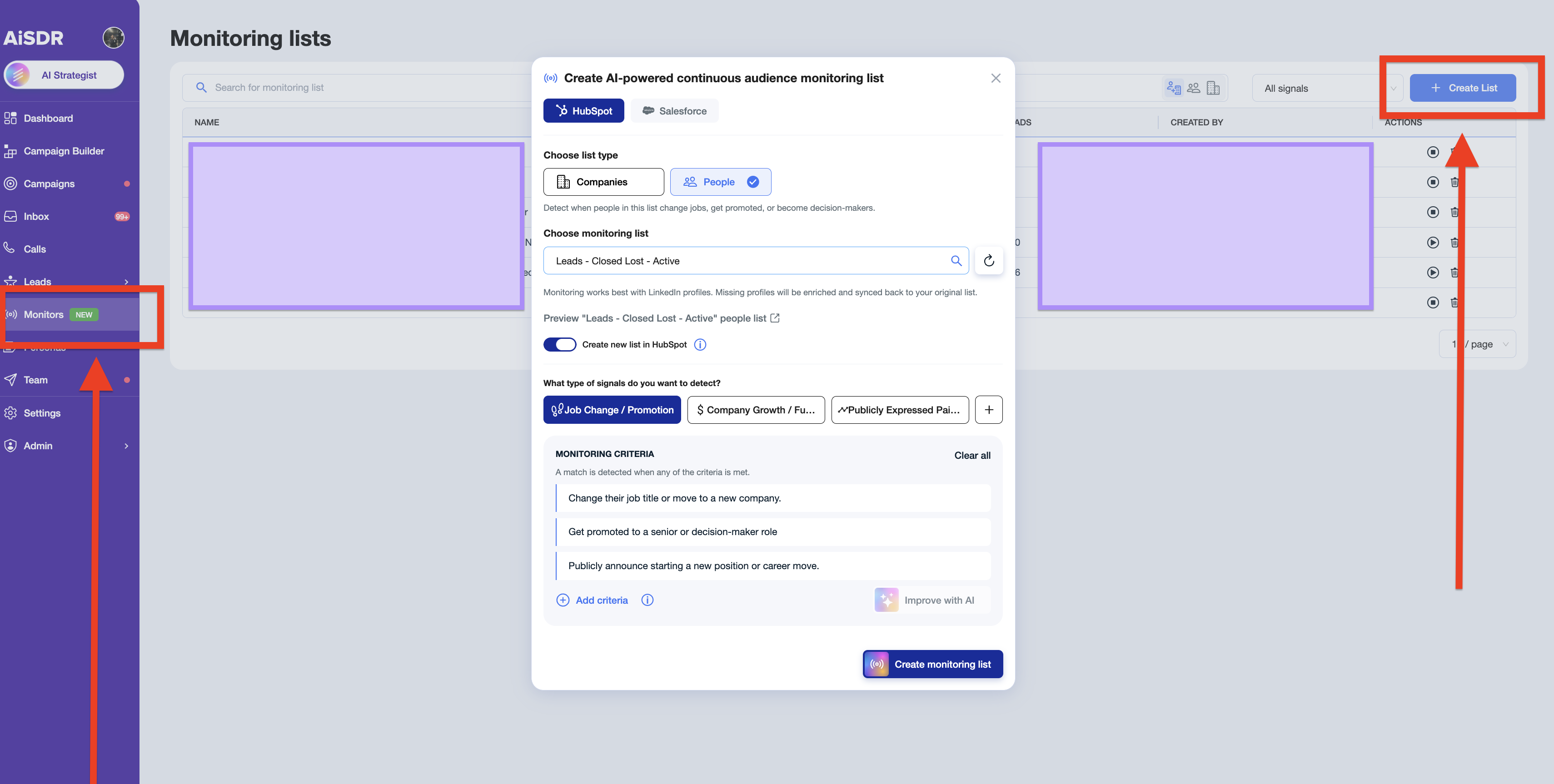
→ Optionally, enable the setting to create a synced HubSpot list for matched records and enriched data.
→ Define the criteria AiSDR should use to score and match records.
→ Create monitoring list
Once activated, AiSDR begins evaluating the selected list automatically and continuously.
Salesforce
Setting up AI Monitoring is straightforward:
Navigate to Monitoring Lists in AiSDR.
Click Create List.
Select Salesforce as your source.
Choose whether you want to monitor people or companies.
Select the Salesforce list you want AiSDR to track.
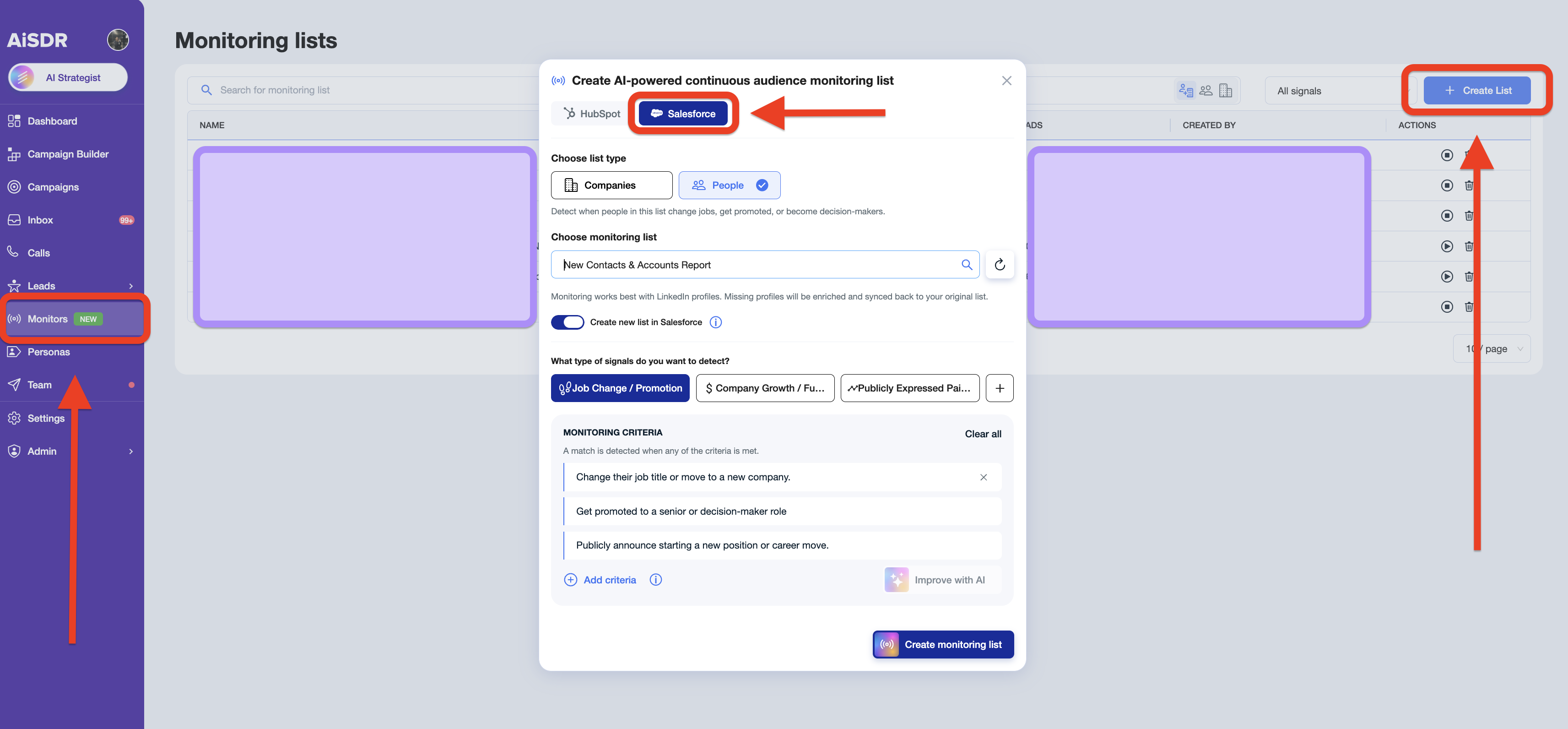
→ Optionally, enable the setting to create a synced Salesforce list for matched records and enriched data.
→ Define the criteria AiSDR should use to score and match records.
→ Create monitoring list
Once activated, AiSDR begins evaluating the selected list automatically and continuously.
How to set up an AI monitoring campaign?
Navigate to Monitors>Choose your Monitoring list
Click on the "Create campaign" button
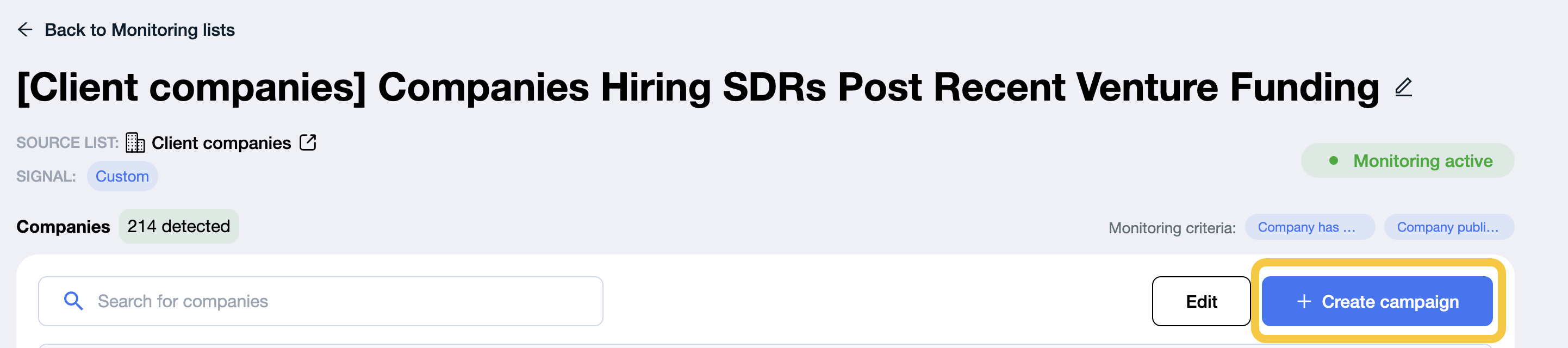
Next, find leads within those companies if you’re using a Companies list, or add leads directly if it’s a Contacts list, and then set up the campaign.
Frequently Asked Questions
What happens after setup?
Once your monitor is active, AiSDR automatically evaluates the selected HubSpot list against the criteria you defined.
For people monitoring | When a contact matches your criteria: |
|
For company monitoring | When a company matches your criteria: |
|
This ensures that meaningful developments are captured automatically, without requiring manual list reviews.
What should I expect from the first run?
The initial run works differently from ongoing monitoring.
First run | Ongoing monitoring |
During the first run, AiSDR processes the entire selected HubSpot/Salesforce list. Because every record is evaluated at once, you may see a relatively high volume of matches immediately. | After the initial pass, AiSDR continues checking the list on a daily basis and adds newly matched records over time as fresh changes are detected. |
This gives you both immediate coverage and continuous monitoring moving forward.
What information appears in the results?
For each matched record, AiSDR may display both current and previous information, where available.
For example, you may see:
→ a person’s current role and company
→ their previous role or employer
→ company changes over time
→ the signal or criteria that triggered the match
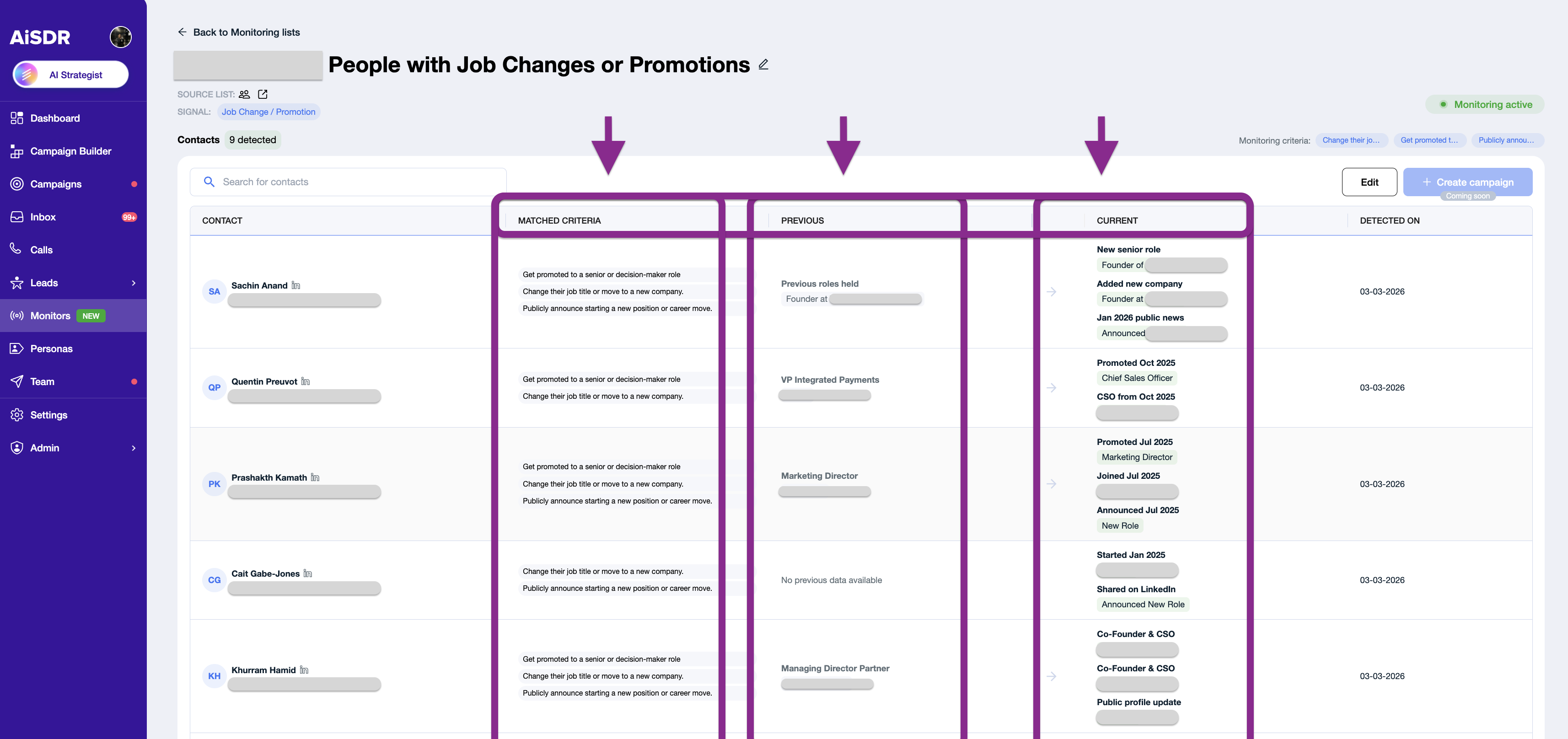
Historical or previous data may not always appear if it cannot be reliably found. You can also hover over a result to view additional details about the matched person or company.
How does LinkedIn's handling work?
LinkedIn data is required for scoring people.
In most cases, HubSpot stores LinkedIn URLs in standard default fields, allowing AiSDR to retrieve them more easily.
If a LinkedIn URL is missing, AiSDR attempts to find it automatically.
Once identified, the LinkedIn URL is synced back to HubSpot immediately after enrichment, even if the lead has not yet met the monitoring criteria.
This means your CRM benefits from improved data quality even before a match is created.
What data is synced back to HubSpot?
If you enable CRM sync or the synced list creation option during setup, AiSDR will write matched results back into the HubSpot/Salesforce list it creates.

Synced data may include: enriched LinkedIn URL, matched criteria, summaries identified for the lead or company
This information is also stored in: lead history + CRM context
It can later be used to support more accurate targeting and deeper personalisation within AiSDR campaigns.
Credit usage overview
Lead segment (list) scoring:
If you have a complete lead list with all the necessary data (first name, last name, email, LinkedIn), you will be charged 3 credits per successful lead score, with no additional charges for data enrichment.
Company segment (list) scoring:
For company lists, it costs 2 Lead Search credits to identify companies, plus additional credits to enrich email and LinkedIn information.
You can find more details under Plans & Billing → Calculation Rules.
How are duplicates handled?
Duplicate handling follows the same logic used across standard lead and company workflows.
If a lead already exists in a campaign and you create another campaign from a people monitoring list, that lead will not be added again as a duplicate. | For company-based flows, duplicate resolution works in the same way as the standard company and lead process. |
This helps keep your campaigns clean and prevents unnecessary overlap.