Why don’t I see an open rate (Open Rate = N/A)?
Last updated: April 7, 2026
Seeing "N/A" next to the Open rate doesn’t mean nobody opened your emails, it means we’re not tracking opens for that campaign. Open tracking is turned off by default in all AiSDR campaigns.
Why open tracking is off by default
Better deliverability: Tracking pixels can trigger spam filters and make messages look promotional, especially under recent Google guidelines. Turning them off reduces that risk.
Better mailbox health: The fewer emails land in spam, the better their health is.
Cleaner signal: Custom features (like image blocking and auto-opens) make data about opens unreliable. Reply rate is usually a better indicator of engagement.

Should I enable open rate tracking?
In most cases, you don’t need to. If your goal is booking meetings or getting replies, focus on reply rate. Enable open tracking only if your team requires that metric for reporting or testing subject lines.
How to enable open rate tracking (optional)
Go to Campaigns and open the campaign.
Click Edit.
Scroll down to the Sequence builder.
Toggle Enable open rate tracking on in the "Settings" section.
Save your changes.
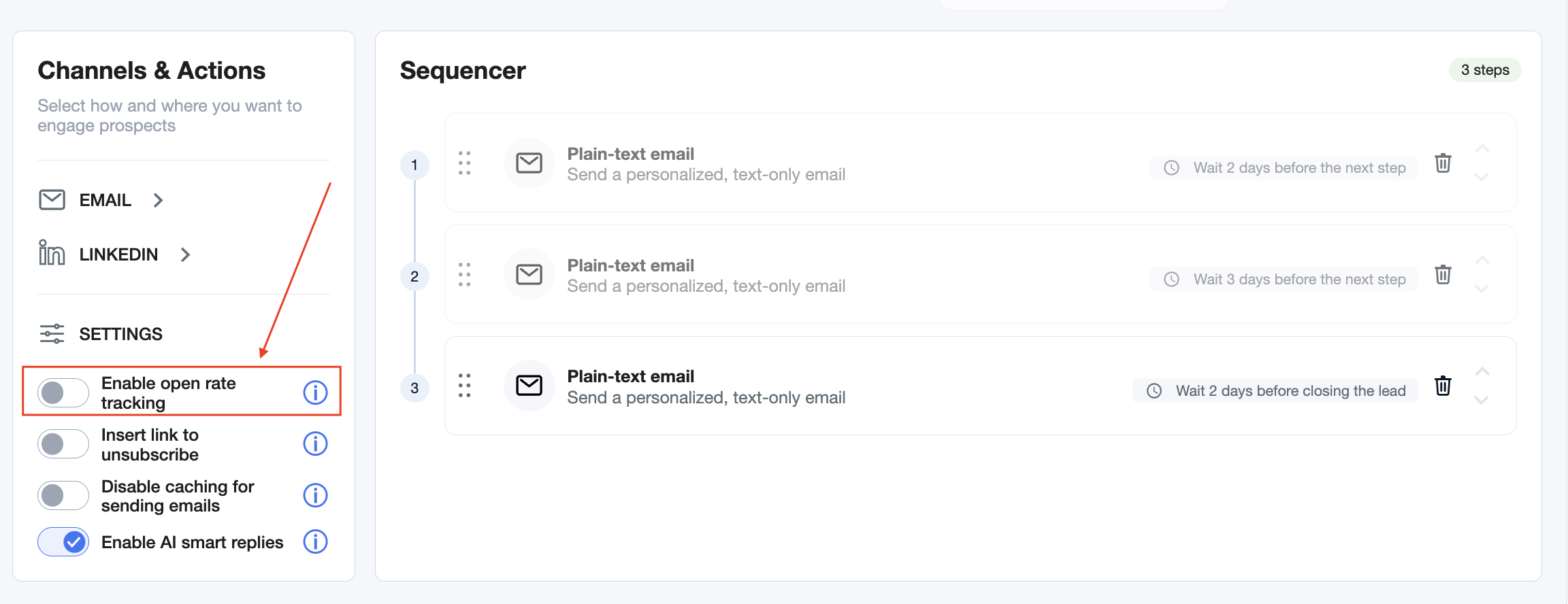
Heads‑up: Changes apply to all emails sent after you enable the setting. So opens will not be tracked retroactively.
Learn how to change other settings here: