How Do I Set the Sending Schedule for My Campaign?
Last updated: July 8, 2025
The Sending Schedule defines when your messages will be delivered to leads. AiSDR uses this information to simulate real human behavior — spreading messages across days and hours instead of sending them all at once.
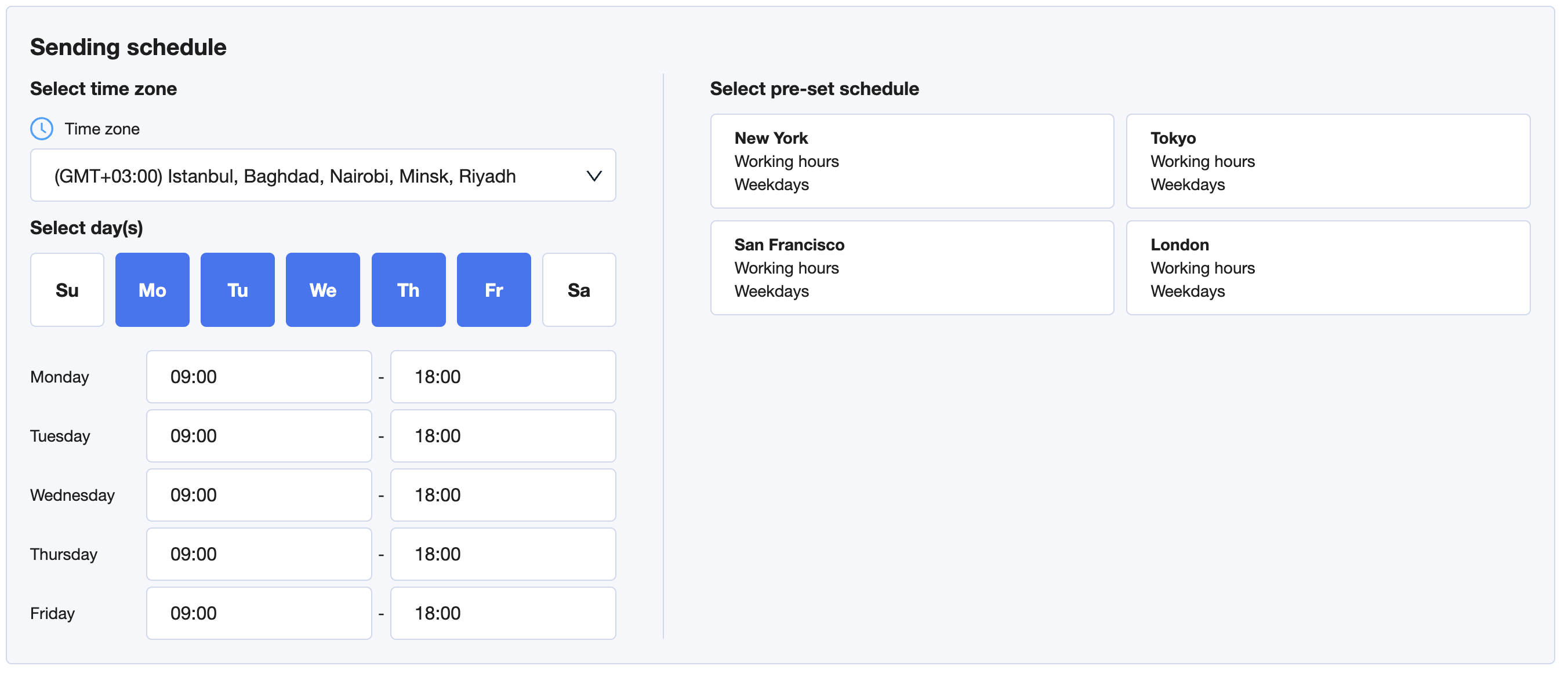
🌍 Choose a Time Zone
Start by selecting a time zone. This should match the region of the leads you've added to your campaign.
If you're targeting leads in different regions, you may want to segment them into separate campaigns with different time zones for better delivery timing.
📆 Select Days and Times
Choose the days of the week and time window during which messages will be sent. You can customize the exact hours for each weekday.
For example:
Monday to Friday
Between 09:00 and 18:00
❗Messages will only be sent during the selected time windows.
⚙ Use Pre-set Schedules (Optional)
On the right, you’ll see pre-configured schedules for:
New York
San Francisco
London
Tokyo
These include standard working hours on weekdays. Click one to auto-fill your schedule with default settings for that city.
🎯 How Messages Are Sent
Once the schedule is set:
Messages will be randomly distributed within your time window
This avoids bulk delivery and helps create a more natural, human-like cadence
This randomness improves deliverability and makes your outreach feel more authentic.