How to Review Your Sequence Setup
Last updated: July 14, 2025
Before launching a campaign—or even while it's running—it's important to double-check your sequence structure to make sure everything is aligned with your outreach strategy.
There are two easy ways to review your full sequence:
✅ Option 1: Via the “Edit” Mode
Go to your campaign.
Click “Edit” at the top left.
This will take you directly to the sequence builder, where you can see and edit each individual step.
Use this if:
You want to make changes.
You prefer a visual layout with drag-and-drop flexibility.
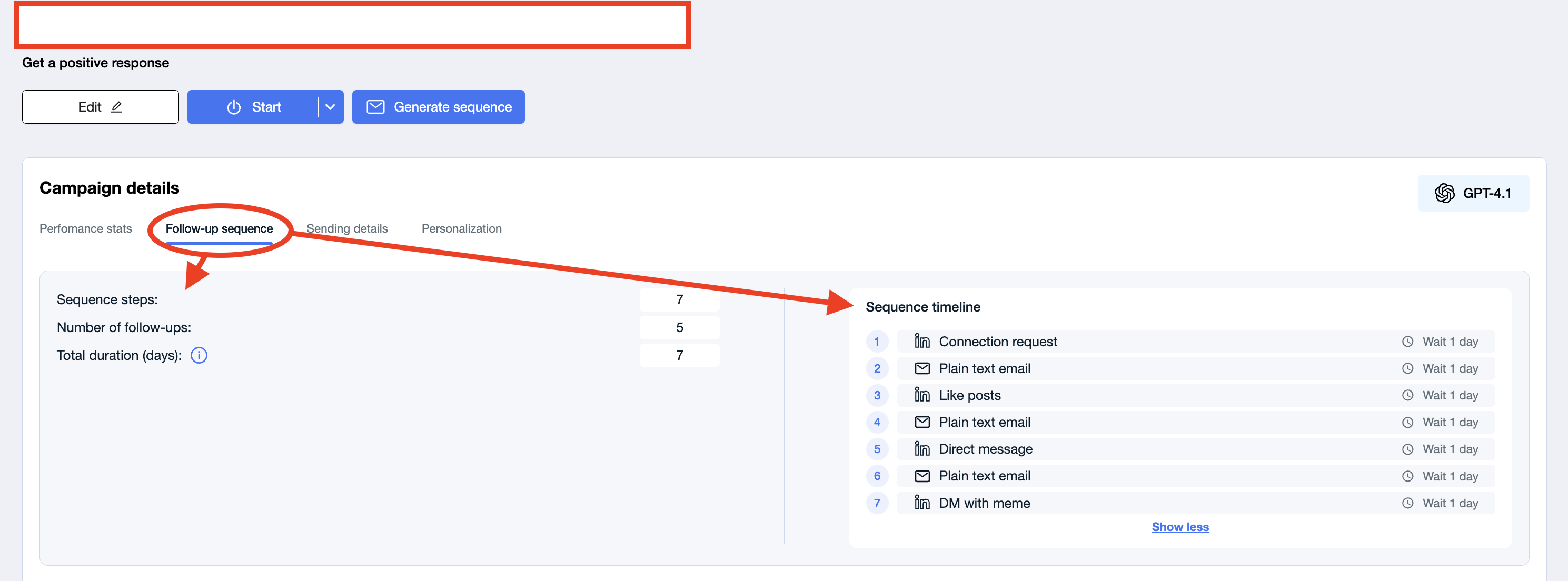
✅ Option 2: From Campaign Overview → “Follow-up Sequence” Tab
Navigate to your campaign.
Click the “Follow-up sequence” tab.
On the right-hand side, you’ll see the full Sequence Timeline — a step-by-step breakdown of the entire sequence.
On the left-hand side, you’ll find summary stats including:
Total number of steps
Number of follow-ups
Total duration in days
Use this if:
You just want a quick overview.
You want to verify delays, channels, and messaging types at a glance.
Both methods give you visibility into the outreach journey your leads will experience. Use them regularly to keep your strategy sharp and optimized!