How to Create a Custom Sequence
Last updated: May 6, 2026
The Custom option gives you full control over your outreach — perfect when you want to tailor every step to your specific strategy.
Getting started
Select the Custom template from the top panel in Sequence Builder.
The Sequencer area will start empty — now it's time to build it from scratch.
Add your steps
On the left, under Channels & Actions, choose whether you want to start with an Email or LinkedIn action.
Expand the section to see all available options (e.g. plain-text email, email with meme, LinkedIn message, InMail, connection request, call step, etc.).
Click the ➕ button next to any step to add it to your sequence.
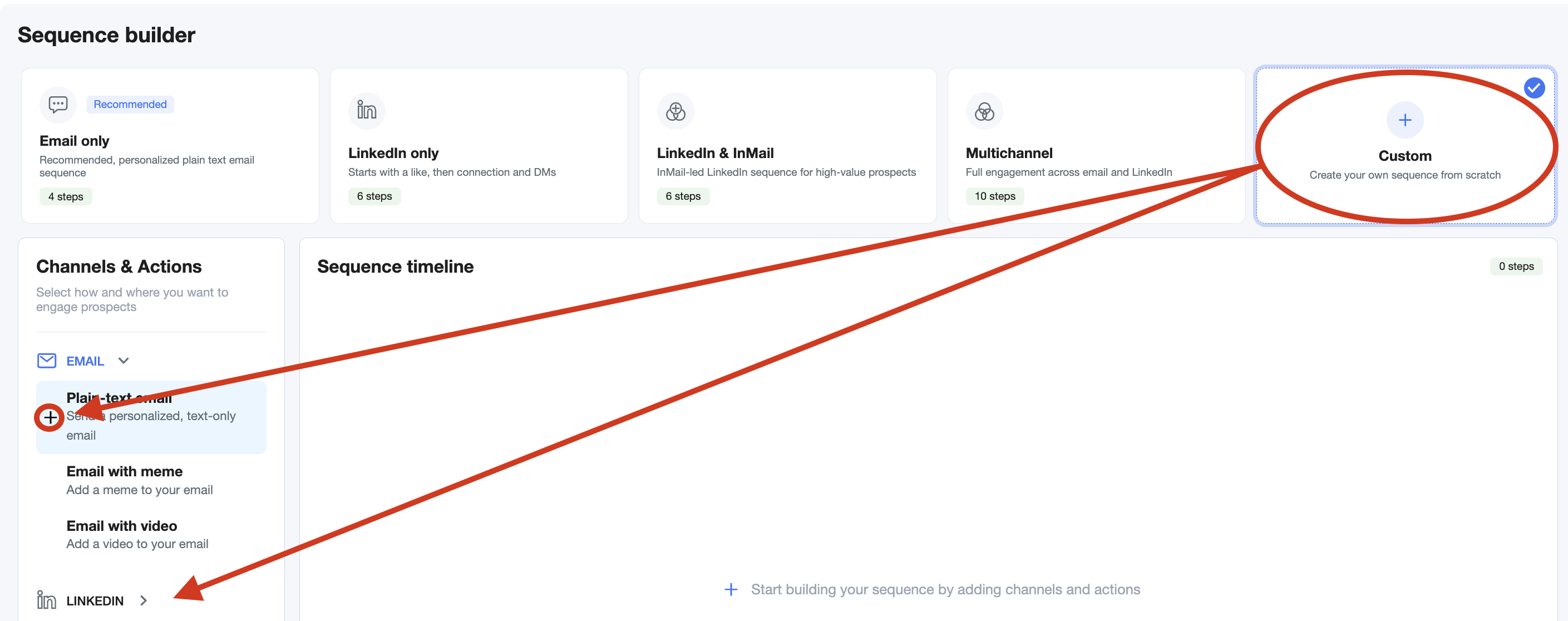
You can add as many steps as you want, mix and match across channels, and reorder them freely.
Tip: You can fine-tune each step later — change delays, message type, personalization, and more.