Why Are LinkedIn Steps Being Skipped?
Last updated: April 14, 2026
LinkedIn steps in AiSDR execute automatically, but there are a few common reasons why they may be skipped.
The main reasons are:
🔗 the sender has not connected LinkedIn in Settings / Team
⚙ LinkedIn was not selected in the campaign settings
⚡ the account reached its daily LinkedIn limit, and Auto-Skip moved leads forward
🚫 the sender or the lead does not have a valid LinkedIn profile
Below is a breakdown of each case and how to fix it.
📍 Where to check LinkedIn connection status
Go to Team → check LinkedIn status.
There you can check whether the account is connected.
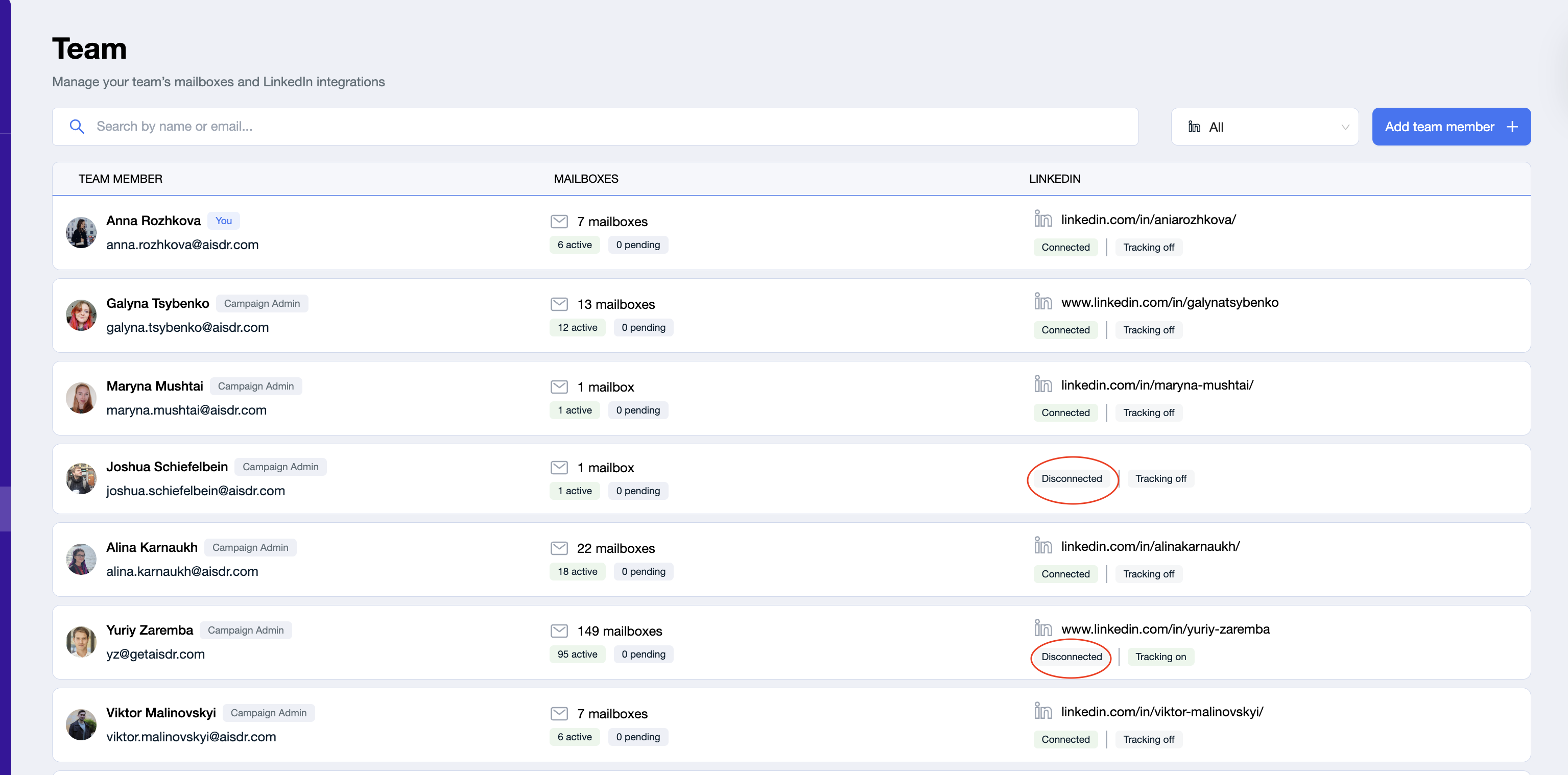
💡 Good to know: LinkedIn is connected on the user level, not automatically on the campaign level. So even if it is connected in Team, it still also needs to be selected inside the campaign.
The four main reasons LinkedIn steps are skipped
1. The sender did not connect LinkedIn in Settings / Team
This is one of the most common reasons.
If the sender has not connected their LinkedIn account in Team settings, AiSDR cannot perform LinkedIn actions on their behalf. In that case, the system automatically skips LinkedIn steps for leads assigned to that sender.
Email steps may still continue, but LinkedIn actions such as connection requests or messages will be skipped.
How to fix it
go to Team
open the sender profile
scroll to the LinkedIn section
connect the sender’s LinkedIn account or ask the user to connect it
✅ Once LinkedIn is connected, future leads assigned to that sender can go through LinkedIn steps correctly.
💡 Good to know: if leads already passed those steps while LinkedIn was disconnected, those skipped steps will not be replayed automatically in the same campaign.
2. LinkedIn was not selected in the campaign settings
Even if LinkedIn is connected in Team, it also needs to be selected inside the campaign itself.
This works the same way as with mailboxes: when you configure senders for a campaign, you need to make sure the sender’s LinkedIn account is checked, not only their mailbox.
If LinkedIn is not selected there, the system will skip all LinkedIn steps for that sender in that campaign.
How to fix it
open the campaign
click Edit
go to the Senders section
check that the sender’s LinkedIn account is selected
make sure the mailbox is selected too
save the campaign
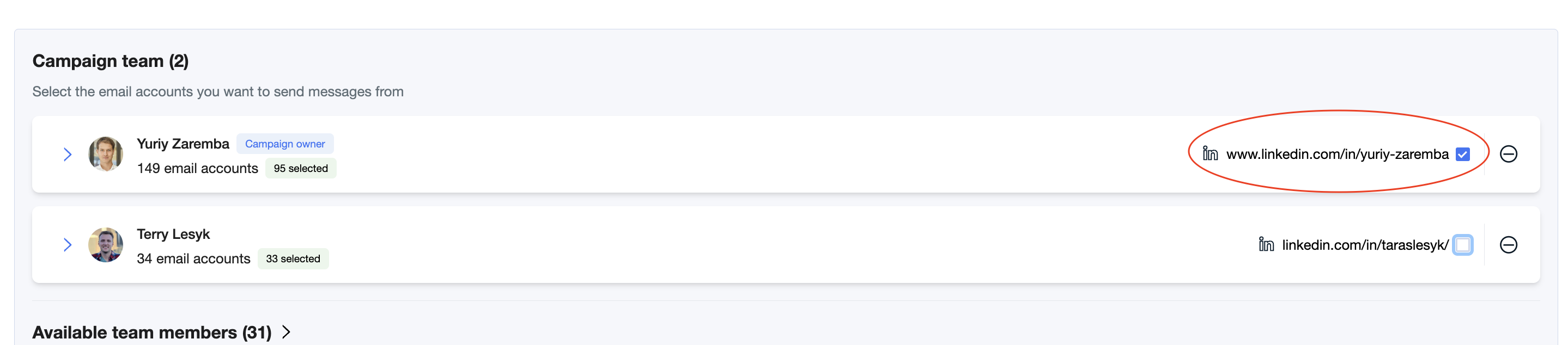
✅ Once LinkedIn is selected in the campaign, the system can use it for LinkedIn steps.
💡 Good to know: a sender may have LinkedIn connected in Team, but if it is not selected in the campaign, LinkedIn steps will still be skipped.
3. The daily LinkedIn limit was reached and Auto-Skip is enabled
AiSDR limits LinkedIn activity per account to keep outreach safe.
If the maximum allowed number of LinkedIn actions for that day (max 20 actions for connection requests and messages) has already been reached, the system cannot continue sending more LinkedIn actions from that account until the next day.

If Auto-Skip is enabled in the sequence, the remaining leads will skip that LinkedIn step and move to the next step automatically.
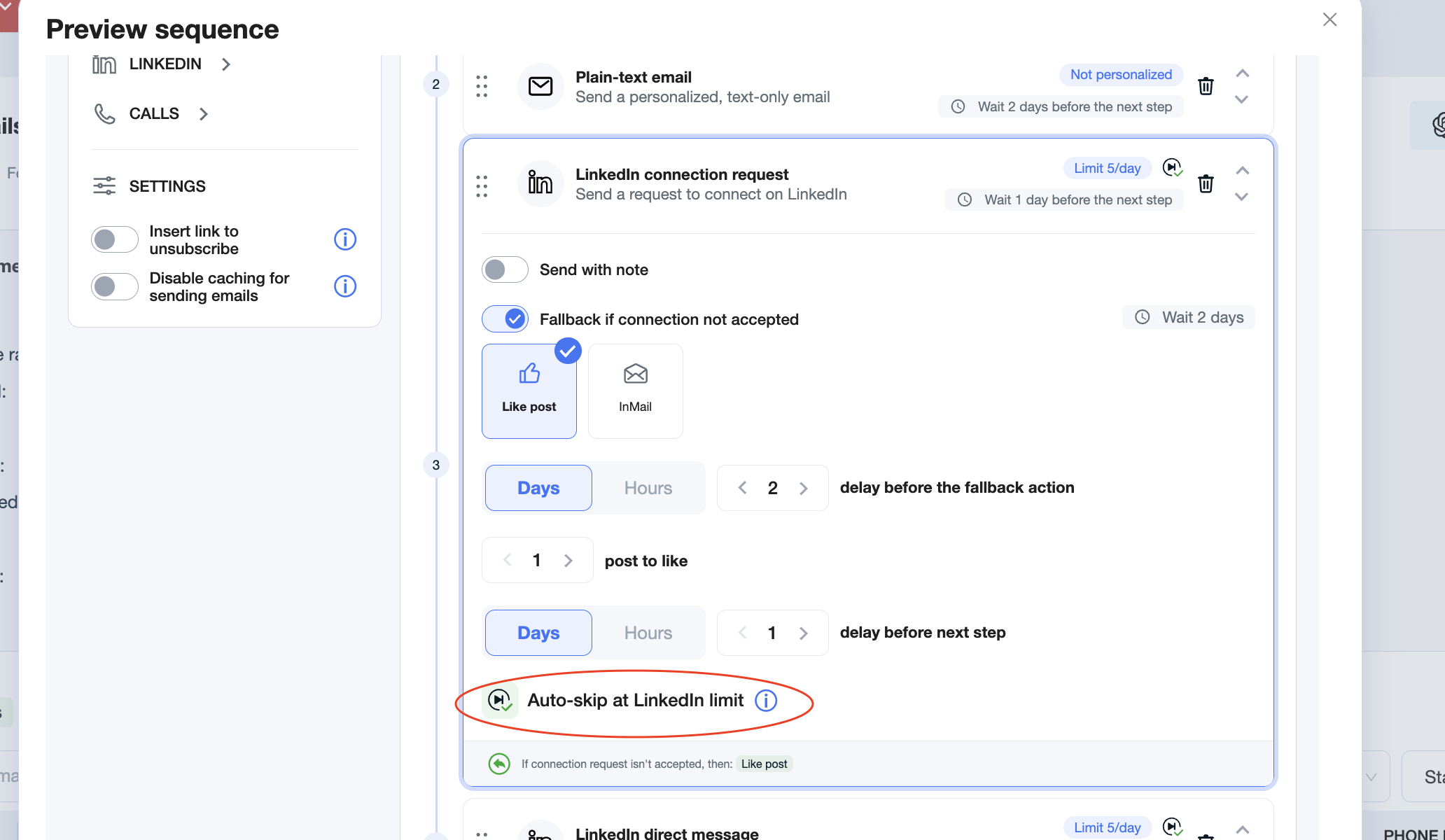
What this means in practice
For example, if the system already sent the maximum allowed number of connection requests for the day, then for the next leads assigned to that sender:
the LinkedIn connection step will be skipped
the leads will move forward in the sequence
How to fix it
You have a few options:
add more senders with connected LinkedIn accounts
adjust sequence settings if you do not want leads to skip that step automatically (before launching the campaign)
✅ This is expected behavior when the daily LinkedIn cap is reached.
💡 Good to know: if Auto-Skip is enabled, skipped LinkedIn steps are not retried later for those same leads in that sequence.
4. The sender or the lead does not have a valid LinkedIn profile
LinkedIn steps can only run when both sides make that possible:
the sender has a connected LinkedIn account
the lead has a valid LinkedIn profile available
If either of these is missing, the system cannot execute the LinkedIn action.
🧩 Best practices
To avoid skipped LinkedIn steps, make sure to:
connect LinkedIn for every sender in Team
select LinkedIn in the campaign sender settings, just like mailboxes
keep in mind that if the daily limit is reached and Auto-Skip is enabled, some leads will skip LinkedIn steps
check that your leads actually have valid LinkedIn profiles (when you use your own lists)