How to update messaging with Ami?
Last updated: August 31, 2026
Ami rewrites your campaign messaging for you. You don't edit sequences by hand, and there's no syntax to learn, but the request does need to be clear: tell Ami which campaign and what outcome you want.
"Update the messaging in {{Campaign name}}. Make the initial email feel more conversational and less sales-driven. Remove the direct meeting ask from the CTA and replace it with a lighter question that checks whether this is something the company is currently thinking about."
Send it and wait: Ami posts a summary of what changed, usually within a minute. Nothing goes live until you approve it.
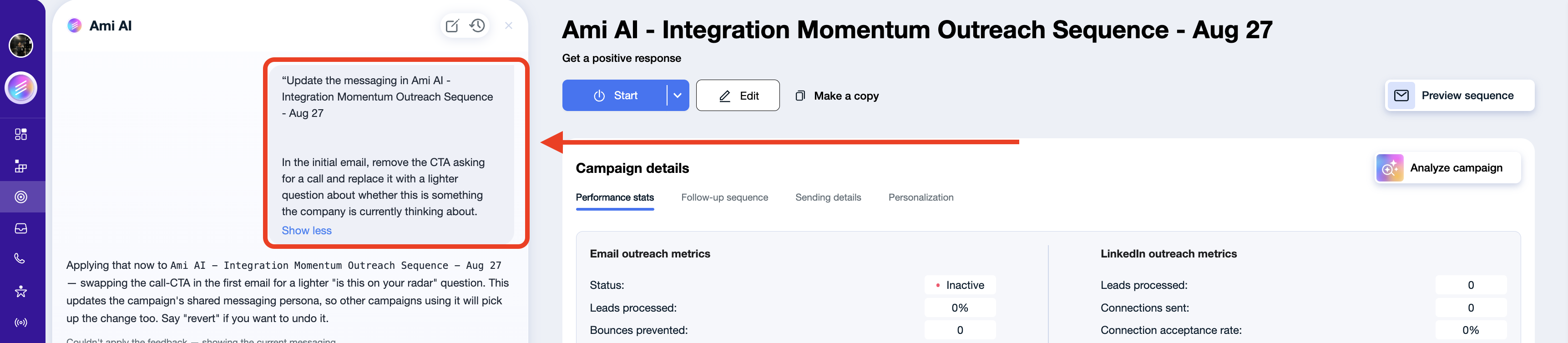
Ami can update the initial email and every follow-up, individual steps in a sequence, LinkedIn connection notes and messages, CTAs, tone and writing style, positioning and value propositions, the personalization approach, and the company, product, or audience context behind the messaging.
Be specific about the outcome, not about the wording
This is the part worth understanding, because it's what makes the difference between a change that sticks and one that doesn't.
Ami isn't only editing the message on your screen. It's also updating the underlying instructions that generate the messaging, so your change carries across the whole campaign and into future variations. That means a request phrased as a banned word gets you a swap: forbid "streamline" and Ami reaches for "optimize," which has the same problem. A request phrased as an outcome changes the logic that produced the word in the first place.
The same holds in the other direction. "Make it better" gives Ami nothing to work with, because better is a judgment you haven't shared. Say what better means to you and Ami has something to apply.
Instead of | Try |
|---|---|
"Don't use the word 'streamline.'" | "Keep the language simple and conversational. Avoid generic SaaS buzzwords and describe the value in terms of the prospect's day-to-day work." |
"Don't say 'I'd love to connect.'" | "Keep the CTA low-pressure and avoid meeting-focused language in the first touch. End with a simple question that invites the prospect to engage with the topic." |
"Make this better." / "Make it more natural." | "Cut the initial email to under 80 words, drop the product description, and lead with the problem their team is dealing with." |
If the campaign is already running
Leads already in the sequence receive the updated messaging from their next scheduled step. If you want the old and new versions kept separate, duplicate the campaign instead of editing it.
Beyond that, treat Ami like a teammate helping you write the campaign. The clearer you are about the result you want, the better Ami applies it, both to the message in front of you and to the messaging logic behind it.