Editing Campaigns with Ami: What You Can Change, What You Can't
Last updated: August 31, 2026
Ami can adjust an existing campaign right in chat — just tell it what you want changed, and it applies the edit directly instead of you clicking through the UI. Simple changes (goal, schedule, status, messaging) apply instantly, even on a live campaign. Structural changes (sequence steps, lead database) are safer before launch, since some fields lock after launch to protect leads already in progress.
✅ Can be edited anytime
No restrictions — safe before or after launch:
Campaign goal
Sending schedule and timezone
Campaign status (active/inactive)
CRM actions
Suppression lists
AI model settings
Sequence settings toggles
⚠ Can be edited, with restrictions
Messaging angle — updates apply to future sends only; messages already sent don't change
Lead search query — affects new leads only; leads already in the campaign aren't re-filtered
Sequence step order or type — only on unsent steps. Once a step has gone out to some leads, you can still adjust its timing and toggles, but not reorder it, change its type, or delete it
Lead database — safest before launch; switching it on a live campaign means rebuilding your filters from scratch
Senders/mailboxes — removing one after launch stops outreach to any leads it already contacted through that sender
Connected LinkedIn account — disconnecting it breaks any LinkedIn steps already built into the sequence
🚫 Can't be edited
Type, order, or deletion of a sequence step that's already gone out to leads — timing and toggles on that step are still fine, everything else is locked to protect leads mid-sequence
💬 How to ask
Just name the campaign and the change you want — no need to specify where the setting lives.
"Pause my HubSpot re-engagement campaign"
"Change the CTA in my SaaS outbound email"
"Switch my Q3 outbound campaign to active"
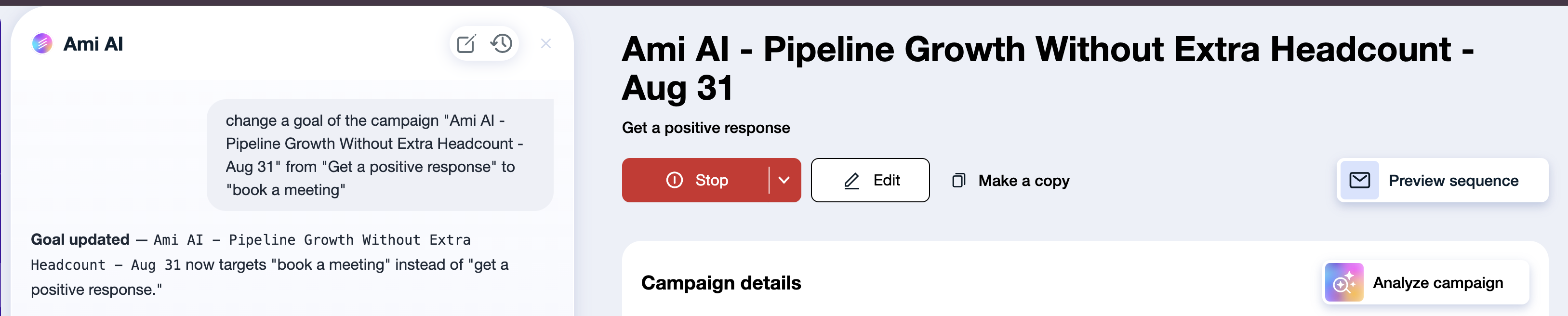
✅ Ami finds the campaign, applies the edit, and confirms what changed.
Final note
Ami handles campaign edits the same way a teammate would — quickly, and with a heads-up before anything risky. If you're ever unsure whether a change is safe on a live campaign, just ask Ami directly; it'll tell you before making the edit.
Related: How to Edit a Campaign: What's Safe, What Has Consequences