Performance Metrics Overview
Last updated: August 12, 2026
The Performance Overview section in AiSDR gives you a high-level snapshot of how your outbound outreach is performing across all channels of your campaigns.
It helps you quickly understand whether your messages are reaching the right people, generating engagement, and converting into meaningful outcomes such as conversations or meetings.
What You’ll See in the Performance Overview
This section displays a series of metric cards that summarize campaign activity and results. Each card shows:
The metric value
A comparison vs. the previous reporting period
A descriptive icon for quick reference
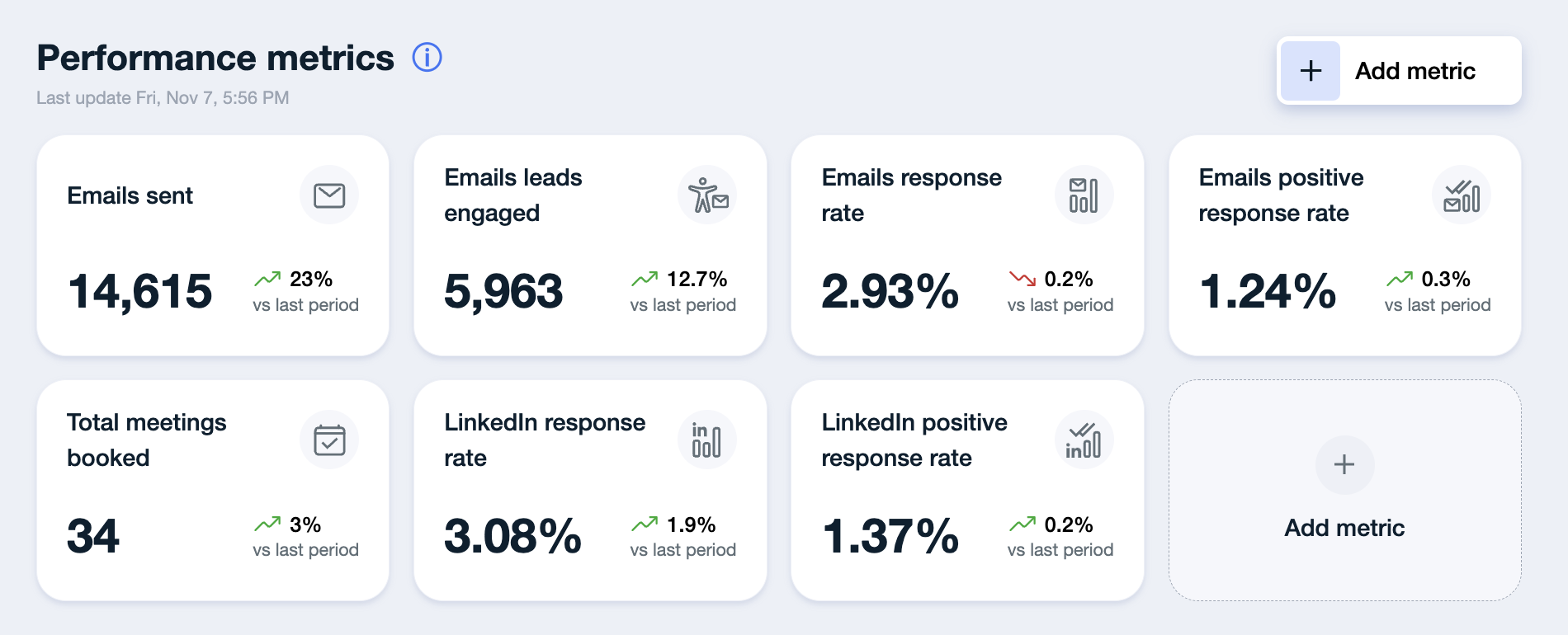
You can choose which metrics matter most to your team and tailor the dashboard layout accordingly. Add, remove, or rearrange sections to focus on what's important.
Available Metrics
You can track a wide range of metrics across email, LinkedIn, and call channels. Some examples include:
📧 EMAIL Metrics
Emails sent - the total number of emails successfully sent across all campaigns, including initial outreach and automated follow-ups.
Email leads engaged - the total number of leads AiSDR sent/attempted to send the emails to.
Open rate - Represents the percentage of emails opened by recipients. If the metric displays N/A, it typically means:
No emails have been sent yet, or
Open tracking is disabled
Note that open rate is disabled by default as it can affect deliverability.
Email response rate - The percentage of leads that replied. Only real responses are counted toward this metric, excluding all OOO messages or delivery failures.
Emails responses - the absolute count of replies received on email during the selected period, regardless of sentiment.
Emails positive response rate - Out of all received replies, this shows the percentage that were positive - such as expressions of interest, referrals, or meeting requests.
Emails positive responses - the absolute count of replies classified as positive on email: leads who showed interest, asked questions, requested more information, or agreed to a meeting.
Bounces prevented - Indicates how many invalid or risky email addresses AiSDR detected and removed before sending any messages. AiSDR automatically validates every email address in real time. If the system identifies an address as invalid (for example, due to a missing domain or inactive inbox), the lead is marked as closed and excluded from sending.
🖇 LINKEDIN Metrics
LinkedIn leads engaged - indicates the number of leads AiSDR made LinkedIn action(s) for, which includes post likes, connection requests, etc.
LinkedIn messages sent - indicates the number of messages sent over LinkedIn
Connection acceptance rate - indicates the percentage of leads that accepted the connection request sent by AISDR.
LinkedIn Connection Requests Sent - the total number of connection invitations sent to leads on LinkedIn during the selected period.
LinkedIn response rate - shows the percentage of leads contacted that responded over LinkedIn
LinkedIn responses - the absolute count of replies received on LinkedIn during the selected period, regardless of sentiment.
LinkedIn positive response rate - shows the percentage of leads contacted whose response had a positive sentiment.
LinkedIn positive responses - the absolute count of replies classified as positive on LinkedIn: leads who showed interest, asked questions, requested more information, or agreed to a meeting.
📞 CALLS & CONVERSATIONS
Total calls - shows the number of total calls made
Connection rate - shows the percentage of the calls where you have reached the lead.
Conversation rate - shows the percentage of the calls with meaningful conversations.
Calls positive conversation rate - shows the percentage of the calls where the prospect has converted into the lead.
📊 OVERALL (Cross-channel metrics)
Total messages sent - shows the number of all emails + LinkedIn messages that were sent out in total.
Total leads engaged - shows the number of all the leads who have been sent at least one message.
Total response rate - shows the percentage of total responses to all sent messages.
Total positive response rate - shows the percentage of all the responses classified as positive.
Total meetings booked - Shows how many confirmed meetings were generated from your outreach.
Zero bookings early on is normal. If this metric remains low over time despite high engagement or reply rates, it may be helpful to review your targeting, messaging, or how conversations are being marked in the system.
💰 REVENUE IMPACT (HubSpot & Salesforce)
Deal & Pipeline Metrics (HubSpot & Salesforce)
These metrics connect your outreach to real deal value in your connected CRM. They're available for both HubSpot and Salesforce, and each comes in a direct and an indirect version.
HubSpot / Salesforce pipeline generated - the value of open deals attributed to leads you contacted directly. Deals marked Closed Lost are excluded.
HubSpot / Salesforce deals won - the Closed Won deals attributed to leads you contacted directly.
HubSpot / Salesforce indirect pipeline generated - the value of open deals attributed to companies you influenced indirectly (see the calculation logic below). Closed Lost deals are excluded.
HubSpot / Salesforce indirect deals won - the Closed Won deals attributed to companies you influenced indirectly.
💵 What the dollar value is based on
The amount comes straight from your CRM. Whatever your team put in the Amount field on the HubSpot deal or the Salesforce opportunity is exactly what AiSDR shows.
AiSDR does not estimate, model, or recalculate deal value
AiSDR does not apply probability weighting by stage
Deals without an Amount are skipped entirely and contribute nothing
✅ Every dollar in these metrics traces back to a number your own team entered in your own CRM.
💡 Good to know: if a metric looks lower than your real pipeline, the most common cause is deals sitting in the CRM with an empty Amount field.
🎯 What "Direct" and "Indirect" actually mean
Direct — the contact on the CRM deal is the same person AiSDR reached out to. Example: AiSDR emailed John Doe, and a deal is later created with John as the contact.
Indirect — the deal is with someone else at a company AiSDR reached out to. Example: AiSDR emailed John Doe at Acme, and a deal is later created with Jane Doe at Acme.
Indirect matching works on company domain, with company name as a fallback.
🚩 Direct does not mean AiSDR booked the meeting. Prospects often don't reply to an email at all: they research you, then convert through another channel. If AiSDR reached out to the person who later appeared on the deal, that's a direct deal, whether or not they ever replied.
✅ This is why indirect exists too. Enterprise deals rarely close with the first person you emailed, and account-level influence still counts.
💡 Good to know:
If a deal qualifies as both direct and indirect, it counts as direct only. Direct always wins, so nothing is double-counted.
For indirect deals, the Engaged by AiSDR person shown is the lead with the strongest engagement at that company (meeting booked beats positive response, which beats awaiting reply).
Indirect deals are deduplicated to one deal per company, so one large account can't inflate the total.
🕐 Which deals qualify, and does the lead need to be new to my CRM?
No, the lead does not need to be new to your CRM. AiSDR doesn't need to be the first to contact them.
A deal counts when all three are true:
A lead on the deal was in one of your AiSDR campaigns
AiSDR sent at least one outgoing touch to that lead (email, LinkedIn message, SMS, or call) before the deal was created in your CRM
The deal is not Closed Lost
✅ Contacts who already existed in your CRM count too. The only thing that matters is timing: AiSDR reached out before the deal opened.
💡 Good to know: this is why the metric is called influenced rather than sourced. Deals that already existed before AiSDR's outreach began are excluded, and Closed Lost is always excluded from pipeline. These numbers are all-time — they ignore the date range you pick elsewhere on the dashboard.
🧮 Why my HubSpot and Salesforce numbers don't match
This is expected behavior, not a bug.
Why it happens:
The same real-world deal often exists in both CRMs with different Amount values
AiSDR reports each CRM separately, using that CRM's own numbers
Neither figure is reconciled or corrected against the other
✅ Read each metric as a view into that one CRM, and treat whichever your revenue team calls the source of truth as your headline number.
💡 Good to know: if one CRM's numbers stop moving entirely for several days, the connection may have expired. Reconnect it under Settings → Integrations and let us know.
💡 BEST PRACTICES
Always fill the Amount field on deals and opportunities. A blank amount makes the deal invisible to these metrics.
Read "Direct" as AiSDR contacted this person, not AiSDR booked this meeting.
Use Details on a card before questioning a number — the deals behind it are listed there.
Compare these metrics all-time, not against a filtered date range.
✅ Log deals in your CRM for every segment you run campaigns for. ❌ Logging only enterprise deals will make campaign pipeline read as zero even when outreach is working.
Pick one CRM as your reporting source of truth if you run both.