How to Evaluate the Performance of Your Campaigns
Last updated: April 23, 2026
Effective outbound relies on running precise experiments, identifying what works, and quickly stopping what doesn’t. AiSDR Dashboard gives you everything you need to monitor results, spot problems early, and double down on your winning campaigns.
This guide explains where to view your campaign metrics, how to interpret them, when to stop campaigns, and how to scale the ones that perform well.
1. How to Evaluate Campaign Performance
Start With the AiSDR Dashboard!
Your Dashboard is the command center for understanding your campaign performance. Here you can choose exactly which metrics to track, including:
Leads engaged
Response rate
Positive response rate (the #1 success metric)
Meetings booked
More about reading metrics: 📄 Performance Metrics Overview
You can also add additional metrics for email, LinkedIn, or other channels overview using Add Metric. We don’t recommend focusing on vanity metrics such as open rates.
2. Use Alerts to Identify Issues Before They Hurt Performance
The Alerts section is one of the most important parts of the Dashboard. AiSDR proactively notifies you when something requires attention so your campaigns don’t get stuck or waste credits.
Here are the key alerts and what they mean:
⚠ Sequence bottleneck
This occurs when:
Your sequence contains both email + LinkedIn steps
The LinkedIn step doesn't have auto-skip enabled
OR your LinkedIn account limits are restricting volume
Example scenario:
Email sends 20/day
LinkedIn can only send 2/day
Without auto-skip, the entire sequence stalls
This causes steps to be sent out of sync, which hurts performance.
Fix: Open the alert → Go to campaign → Enable auto-skip or adjust LinkedIn capacity.
⚠ Too few leads added
Your filters may be too narrow or signals aren’t matching the right audience. If your campaign isn’t adding leads daily, it will eventually stall.
Fix: Review your targeting filters and adjust your filter/signal settings.
❌ No positive responses in 14 days
This is the most critical alert.
If a campaign hasn’t generated a single positive reply in 14 days and volume is decent, the campaign is almost certainly not working.
Action: You should stop this campaign and reallocate volume to something else. If needed, speak with your CS Manager for guidance.
More details in this guide: 📄 Alerts in AiSDR Dashboard
3. Review Campaign Performance Regularly
Scroll to Campaign Performance to see all active campaigns, their volume, and their outcomes. Sort by positive response rate - this is the best indicator of what’s working.
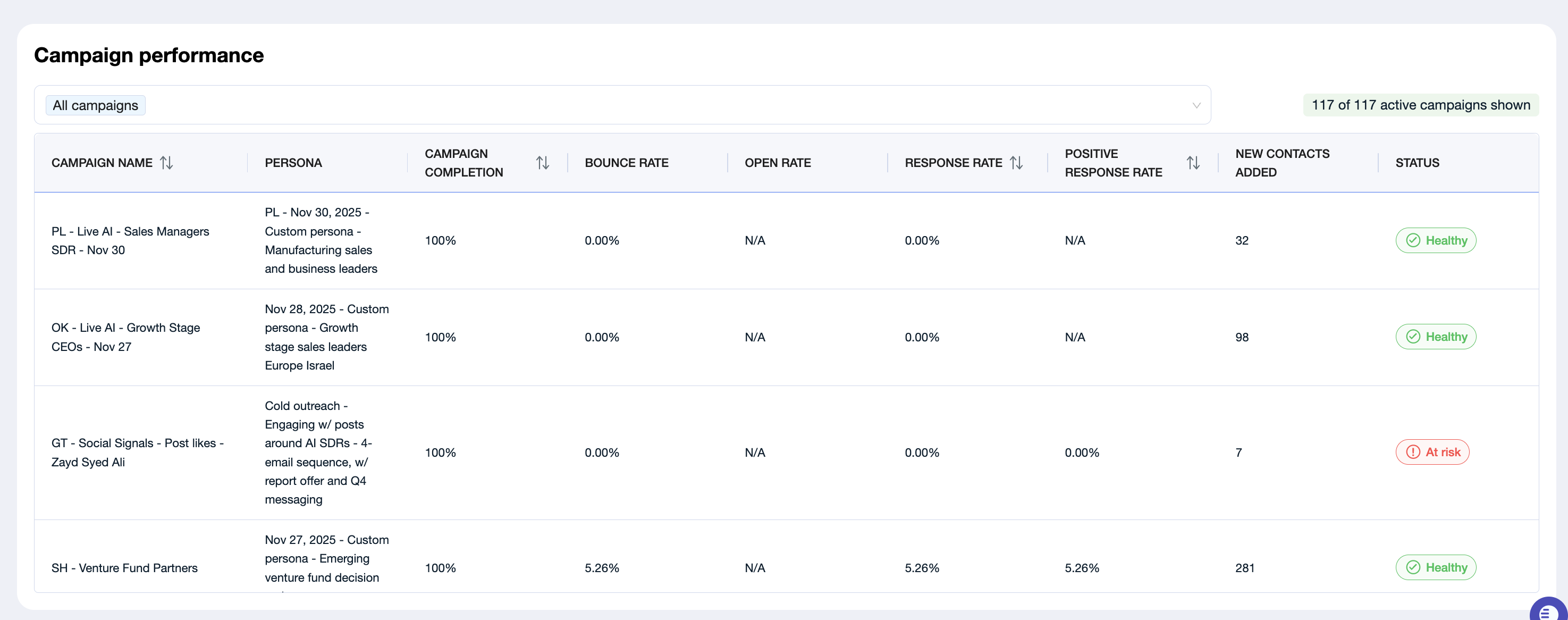
Stop campaigns with a positive response rate below 0.3%
Campaigns under 0.3% indicate problems with:
Targeting
Messaging value
Channel selection
High-performing outbound is precise - if something isn’t converting, it’s better to stop and try a better angle.
4. When to Stop a Campaign
Stop or pause a campaign if:
❌ It has no positive responses after 3–4 weeks
❌ You’ve received the No positive responses in 14 days alert
❌ The positive response rate is under 0.3% (CEO best practice)
❌ No meetings have been booked in several weeks
❌ You have too many campaigns running and each is not sending enough volume
Note: How many campaigns should you run?
Based on your monthly plan:
Plan | Recommended Active Campaigns |
1,200 messages/month | ~3 campaigns |
4,500 messages/month | ~9 campaigns |
6,000 messages/month | ~15 campaigns |
Higher volumes | More campaigns are fine |
Too many campaigns = Too little volume per campaign = Poor results.
5. What to Do If None of Your Campaigns Are Performing
If you review performance & resolve alerts but still get no traction, use the Outbound Magic Quadrant Framework.
Every successful campaign relies on 3 levers:
Targeting + Offer + Channel
Fix them in this order:
1. Improve Targeting
High-performing campaigns target narrow, high-signal audiences.
Examples of strong targeting signals:
New product launches
Funding announcements
New leadership hires
Fresh job openings in relevant roles
Geographic expansion
Tech stack changes
Ask yourself:
What public event or signal makes a company more likely to buy?
What are the top 3–5 signals my best customers share?
AiSDR can generate extremely precise lists—but you define which signals matter.
2. Strengthen the Offer
Most outbound fails because the “offer” is just:
“Want to book a meeting?”
“Do you have time to chat?”
These are low-value asks.
High-performing offers provide value first:
Free assessment
Audit or benchmark
Report or resource
Industry-specific guide
Webinar or event invite
Insights tailored to their company
The more value you give upfront, the better your response rates.
3. Adjust the Channel
If targeting & offer are good but results are still low:
Try LinkedIn-only campaigns
Add calling steps
Use email + LinkedIn + calling for maximum reach
Some industries simply don’t respond to email - channel fit matters.
6. How to Identify Campaigns to Double Down On
Campaigns worth scaling share these characteristics:
✔ Positive response rate of 1%+
This is a strong signal you’ve found fit.
✔ At least 1 meeting booked
Meeting = validated offer + validated audience.
✔ Consistent replies
Even if not all positive, consistent engagement means you’ve found resonance.
Here are the key alerts and what they mean:
How to Double Down Successfully?
Ensure the campaign has at least 100+ leads
Less than 100 leads produces unreliable data.Review what's working
Which signals did you target?
Which messaging angle resonated?
Which channel performed best?
Expand the winning pattern
Add more leads that fit the same profile
Clone the campaign with small variations
Increase volume and test new versions of the same angle
Your goal is to scale what works - not reinvent everything.
Summary
AiSDR gives you the tools to build high-performing outbound campaigns, but performance comes from:
Clear targeting
Value-driven offers
Channel fit
Consistent monitoring
Stopping what doesn’t work
Scaling what does
Use your Dashboard to track positive response rate, resolve alerts, and regularly review your campaign performance. When in doubt, simplify your setup, focus your targeting, and test high-value offers.
Our CS team is here to help you troubleshoot or strategize! Just email us at help@aisdr.com