Alerts in AiSDR Dashboard
Last updated: August 12, 2026
The Alerts section in AiSDR dashboard helps you stay on top of potential issues before they impact performance. It highlights situations that may require your attention so you can fix problems early, avoid wasted credits, and keep campaigns moving smoothly.
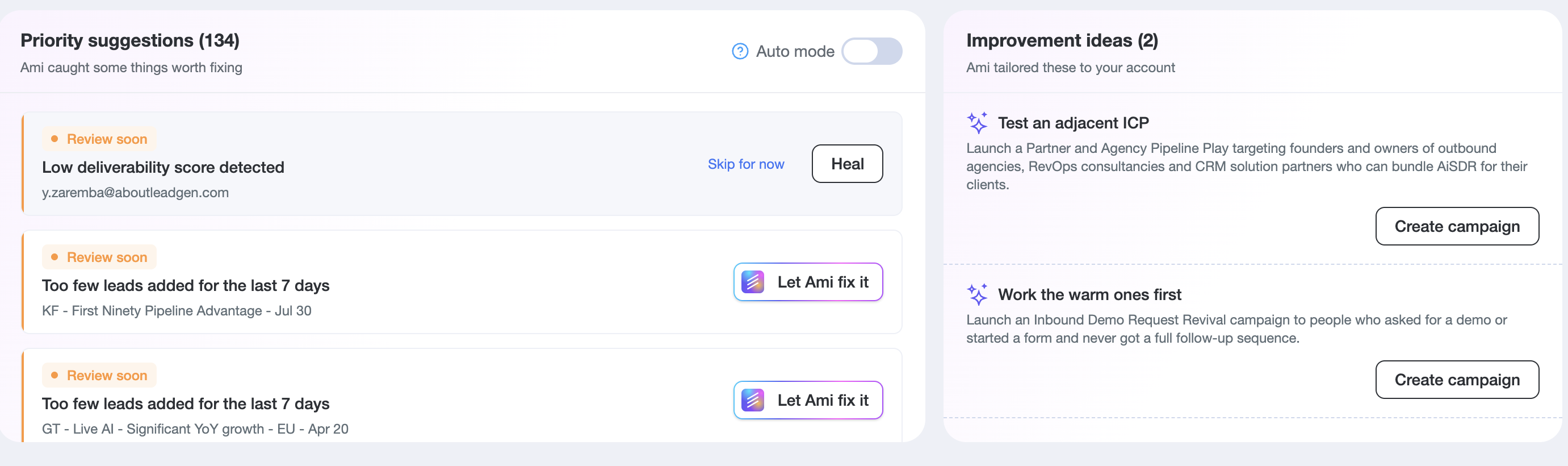
We have two sections for alerts - Priority Suggestions and Improvement Ideas from Ami.
Priority Suggestions
1. Low deliverability score
This alert shows when a lookalike mailbox's deliverability score drops. The mailbox must have been connected for 7+ days and be assigned to a campaign.
What to do:
Go to Team tab -> Open the Sender/s who has the assigned mailboxes to them and click Heal on the mailbox where deliverability dropped.
2. Too few leads added for the last 7 days
This means that a campaign has been active 7+ days but is adding fewer leads than expected over the past week. Suggests widening your audience filters or importing new contacts.
What to do:
Click on Let Ami fix it button for Ami to broaden the prompt in the campaign accordingly, so it starts adding more leads.

3. Positive response rate below 1% after 21+ days
Fires when a campaign has been sending for 21+ days and the response rate is still below 1%. A nudge to try new messaging, subject lines, or targeting.

What to do:
Click on Let Ami fix it for Ami to adjust the messaging based on our best practices to try and bring back more replies.
4. No active campaigns running
Shows when there is no active campaigns for 3+ consecutive days. A reminder to launch or reactivate something.

What to do:
You can either launch or unpause any campaign, or click on Let Ami fix it, so Ami creates the campaign for you.
5. Gmail/Outlook/LinkedIn disconnected
This alert shows when your lookalike AiSDR mailbox or your LinkedIn got disconnected from a platform.
What to do:
If the LinkedIn got disconnected, reconnect it in Settings - > Integrations.
If the mailbox got disconnected, contact your customer success manager, or text us in Live Chat, so we can assist you with it.
6. Hubspot/Salesforce disconnected
HubSpot CRM integration or Salesforce CRM In lost connection.
What to do:
Reconnect your CRM in Settings - Integrations.
7. Salesforce package update available
This alert appears when a new version of the AiSDR Salesforce package (ECA) is available.
What to do:
This alert disappears after reconnecting Salesforce to AiSDR.
8. Unused mailbox credits
This alert fires when your account has mailbox credits sitting unused. Encourages you to order more mailboxes to use your available sending capacity.
What to do:
Go to Team tab -> Find Order mailboxes button -> Proceed with ordering additional lookalike mailboxes
Improvement Ideas generated by Ami Ai
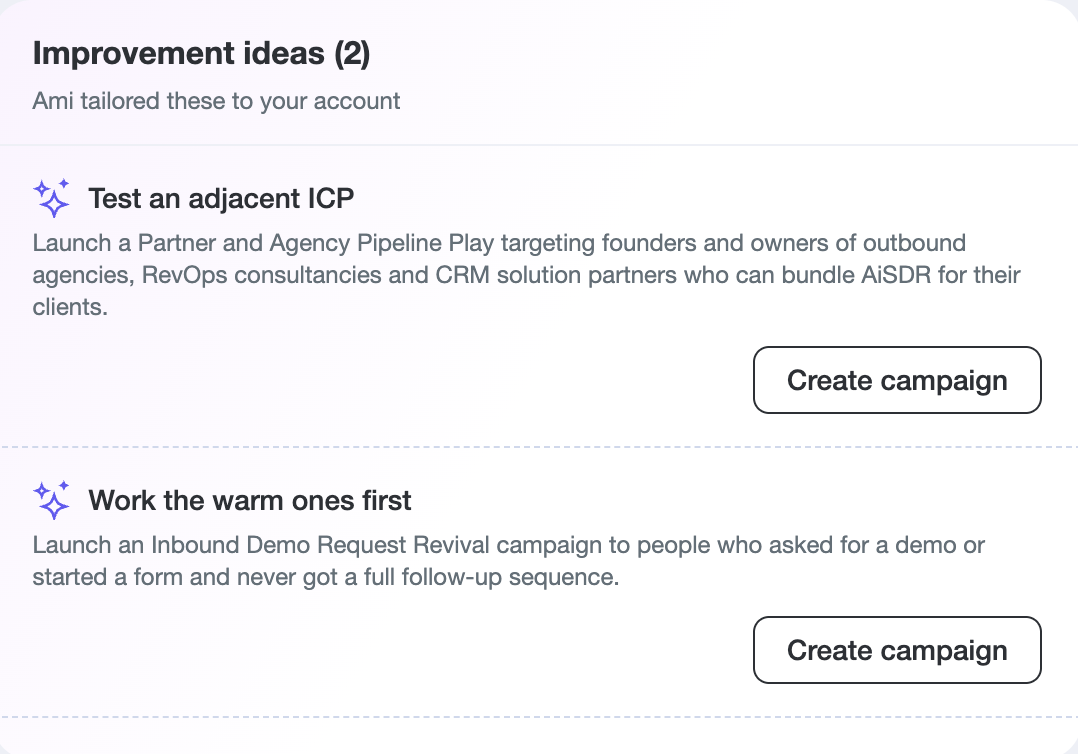
Improvement Ideas is a section on the dashboard (right next to Priority Suggestions) where Ami surfaces AI-generated, account-specific recommendations -- mostly new campaign ideas.
How it works:
Every week, Ami reviews your account's campaign performance, reply patterns, credit usage, CRM status, industry events, and what's working for similar companies. Based on that analysis, it generates up to 5 tailored ideas per account.
What kinds of ideas appear:
• New campaign suggestions -- e.g. "expand your winning motion to healthcare HR leaders" or "create a pre-event play targeting attendees of an upcoming industry conference." Each comes with a short explanation of why and supporting numbers.
• Connect your CRM -- if HubSpot/Salesforce isn't connected yet, Ami may suggest it to unlock better targeting.
What you can do:
• Click the action button (e.g. "Create campaign") -- this opens Ami chat with everything pre-loaded so Ami can build the campaign right away
• Click "Skip for now" to dismiss an idea you're not interested in
Notes on Improvement ideas section:
• Ideas refresh weekly and stale ones are automatically retired
• Dismissed ideas won't come back -- Ami remembers what was skipped
• Up to 3 ideas also appear in the weekly digest email with a direct link to act on them
• The section shows an "all clear" state when there's nothing new to suggest