Can a Lead Be in Two Campaigns at the Same Time?
Last updated: September 15, 2026
A lead cannot be actively targeted in two existing campaigns at the same time. When new leads are added, AiSDR automatically checks every email address to make sure the same lead wasn't enrolled in any of the campaigns before.
How duplicate leads are handled when creating a new campaign
When you create a new campaign, AiSDR automatically checks if any of the leads you're trying to add are already active in another campaign. If duplicates are detected, we’ll flag them for you before the campaign is finalized.
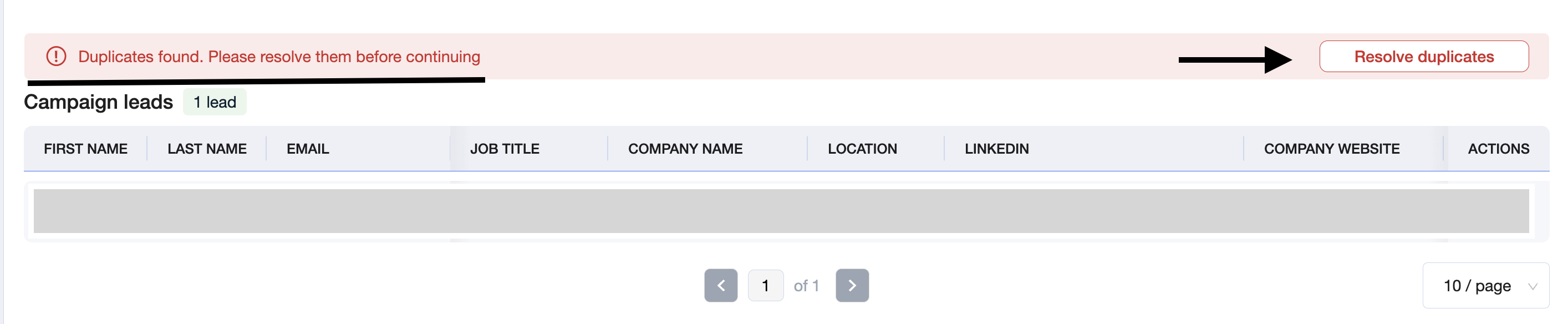
Once AiSDR detects a duplicate, it will show a red error message notifying you, and you won't be able to proceed with adding leads before the duplicates are resolved.
What happens next?
You’ll be prompted to resolve the conflict by choosing what to do with each duplicated lead:
Keep the lead in the original campaign, and exclude them from the new one
Contact the lead in the new campaign, and close in the previous one
This ensures you’re never unintentionally targeting the same person twice, while still giving you full control to retarget when it makes sense.
Exceptions:
1 — Syncing two HubSpot lists that contain the same contacts
When you sync more than one HubSpot list and both lists include the same email address, AiSDR automatically:
Keeps the lead in the campaign linked to the list that synced first.
Instantly sets the same lead to Closed in the campaign coming from the later list.
This process is fully automated; users cannot override it.
2 — Duplicates discovered by Add fresh leads daily
Add fresh leads daily re‑runs your search criteria on a schedule to keep a campaign topped up with fresh leads. If the recurring search surfaces a contact that’s already active in another campaign, AiSDR will:
Add the lead only to the first campaign it discovered.
Automatically skip that contact for every subsequent search—no matter how many other campaigns are running the same criteria.