Latest Replies: Tracking All Responses in One Place
Last updated: November 18, 2025
The Reply Feed section of the AiSDR dashboard is your centralized view for monitoring and reviewing all incoming responses from your outreach campaigns — both via email and LinkedIn.
This section gives you immediate visibility into engagement outcomes, making it easier to take action, qualify leads, and spot patterns across campaigns.

How You Can Sort Replies:
At the top of this section, you’ll find four tabs that let you filter by type of reply:
Latest replies – See all recent replies from leads, regardless of sentiment or platform.
Latest positive replies – View only responses where the lead showed interest or agreed to connect further.
Latest meetings booked – Focus exclusively on leads who converted and were marked as “Booked.”
Latest LinkedIn replies – Filter responses that came specifically through LinkedIn messages.
What You’ll See in the Table:
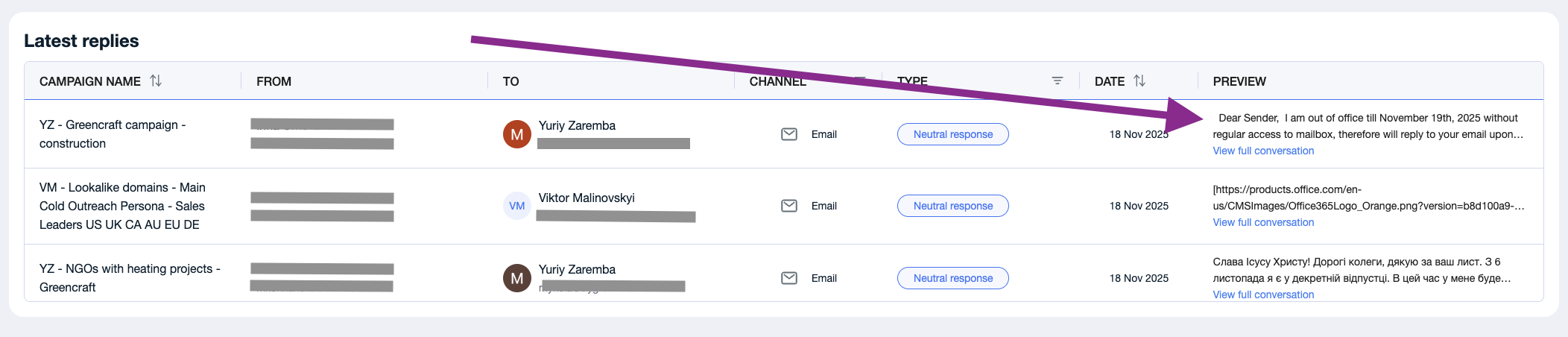
Each row in the reply feed gives you detailed info about the interaction, including:
Campaign Name – The name of the campaign that triggered the reply.
From – The sender from your team who initiated the outreach.
To – The lead who responded.
Channel – Email / Calls / LinkedIn.
Type – The classification of the reply (e.g., positive, neutral, unsubscribe, booked, etc.).
Date – When the reply was received.
Preview – A snippet of the lead’s actual response.
Additionally, each row includes a “View full conversation” link. Clicking this will take you directly to the full message thread with the lead — allowing you to review the context, tone, and prior exchanges for better follow-up decisions.
📄 How to Reply from the Dashboard
Using the “Type” Filter
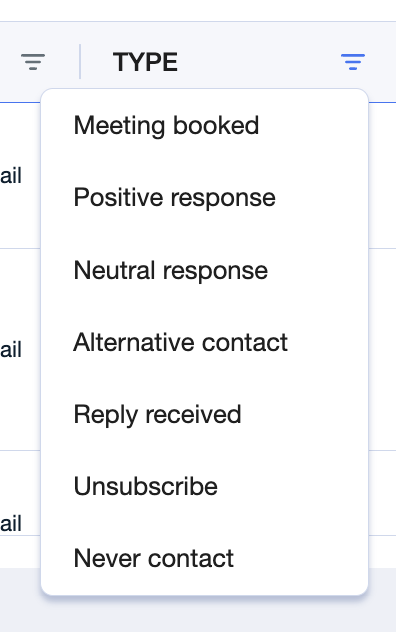
On the top right, you’ll find a “Type” filter dropdown that lets you narrow the results even further. You can filter replies by:
Positive response
Booked
Neutral response
Unsubscribe
Alternative contact
This makes it easy to prioritize who to follow up with, who to disqualify, and who’s ready for a handoff to sales.