Can Multiple Senders Be Used in One Campaign?
Last updated: June 23, 2025
Yes! You can have multiple senders in a single campaign.
This is especially useful when:
Testing which sender title drives better engagement (e.g., do prospects respond more to your CEO, CMO, or Head of Partnerships?)
🧠 Pro Tip
Having multiple senders helps improve deliverability and increases chances of engagement — especially when targeting multiple personas or regions. Just make sure each sender is aligned with the messaging and audience assigned to them.
How to Add Multiple Senders
Open the Campaign Setup
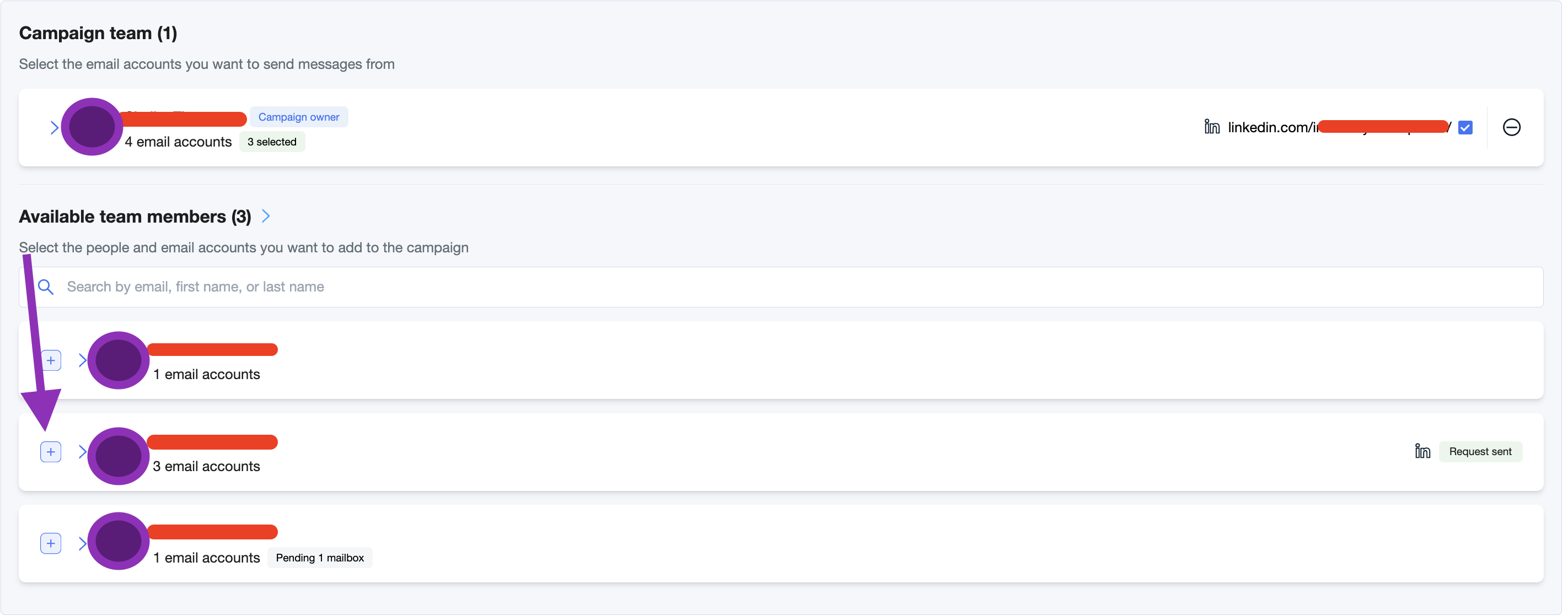
Begin creating or editing your campaign.Go to the “Campaign Team” section
You’ll see a list of all users with connected mailboxes.Select Additional Senders
Click the “+” icon next to each user you want the campaign to send on behalf of.Each selected sender’s signature and mailbox will be used automatically.
You can add or remove senders at any time before launching the campaign.
That’s it—your campaign will now rotate messages across the senders you selected.
If You Only Need One Sender
Use the same steps above but select only one account. The campaign will then send exclusively from that person’s mailbox and signature.